

Cost-effective laptop computers (How to choose the most cost-effective laptop computer for you?)
Before purchasing a laptop, I received seven or eight quotations. The price differences among these quotations varied from a few hundred yuan to thousands of yuan. Surprisingly, many people became even more confused because of this. In fact, if you can understand the core parameters in the configuration sheet, you can avoid the "low price trap" planted by the merchants and find a machine that is truly a good deal.
When looking at processor algebra, don’t just look at i5i7
The performance of the 10th generation i7 processor is not as strong as the 13th generation i5, but the price is about 800 yuan higher than the 13th generation i5. Starting from the second half of 2025, the Intel Core Ultra series and AMD Ryzen 8040 series will become mainstream products, and products with new architectures will be given priority at the same price point. For example, if you have a budget of 7,000 yuan, it is more worthwhile to buy the Ultra5 125H than the old i7-13700H. This is because the NPU unit integrated in the new processor can accelerate AI photo editing software.
Actual measurement data shows that the Ultra5 125H is 15 percent faster than the i7-13700H in exporting video clips, and its power consumption is 20 watts lower. In offline computer malls, "i7" is often used as a selling point to attract customers, and the specific algebra is intentionally not indicated. You can use your mobile phone to search for the processor model on-site and check its Cinebench R23 scores. Cost-effective laptops (how to choose the most cost-effective laptop for you?). A single-core score of 1,800 or more is considered to meet the standard requirements.
16GB of memory is the bottom line, but don’t stop there
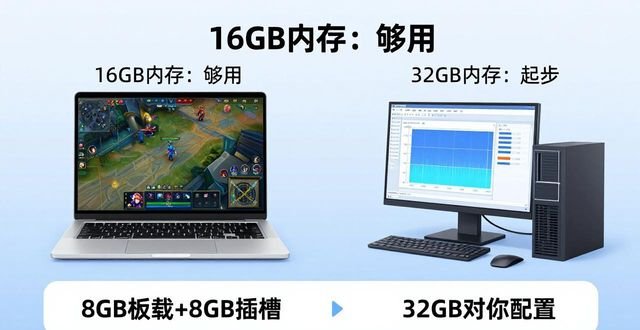
At this moment, the Windows 11 system occupies 4.5GB of memory after it is turned on. At the same time, with 10 web pages opened, plus WeChat and documents, the memory usage easily exceeds 12GB. By 2026, mainstream software is increasingly consuming memory. How to choose the most cost-effective one after receiving multiple quotes ? The recommended configuration for Adobe's family bucket is already 32GB. If you plan to use it for three or four years, then directly choose the model with 32GB of onboard memory. Although it will cost 500 yuan more than installing it yourself later, it is very worry-free.

Two special situations should be noted: 16GB is enough to play online games such as "League of Legends", but for 3D rendering or virtual machine development, 32GB must be the starting standard. Some low-priced models are marked with "16GB memory", which is actually a combination of 8GB onboard and 8GB slot. This dual-channel combination will reduce performance by 10%. The most accurate way is to disassemble the machine and check the memory slots, or ask customer service if the product is "dual-channel symmetrical configuration".
The hard disk depends on the read and write speed rather than the capacity.
The starting threshold is a 1TB solid-state drive. However, the speed of PCIe 3.0 and PCIe 4.0, which are also 1TB, is four times different. After 2025, software loading speed will depend on the random reading and writing of the hard disk. If the hard disk is slow, you will have to wait seven or eight seconds to open a large file. Use CrystalDiskMark software for testing. If the sequential read rate is lower than 3500MB/s, it is an old model. Do not buy it.
There is a trick to save money, that is, the model equipped with a 512GB hard drive is 400 yuan cheaper than the 1TB model. It will be more cost-effective to spend 300 yuan to buy a 1TB PCIe 4.0 hard drive to replace it. However, it should be noted that the hard drives of some thin and light notebooks are welded and cannot be replaced. After receiving multiple quotes, you should choose the one with the best price/performance ratio . Before purchasing, you should go to the official website to check the disassembly diagram. Gamers should pay attention to the hard drive cache size. A hard drive without cache will slow down to 200MB/s when writing large files continuously.
The actual power consumption of a graphics card does not depend on the model name.
The RTX 4060 graphics card has a 35-watt residual version and a 140-watt full-blood version. The performance gap can be as high as 40%. Those merchants simply write "RTX 4060" but do not indicate the power consumption. However, the price difference is actually 1,500 yuan. Go to the Biba evaluation room to check the double-baked data of the same model. The graphics card power consumption can be maintained relatively stably at more than 100 watts to be considered qualified. For example, the 4060 in the Lenovo Savior Y9000P provides 140 watts, but a certain brand of thin and light notebook only has 45 watts.
Office work and light PS do not require a separate graphics card. The 780M core graphics provided by AMD processors can already play "Cyberpunk 2077" at medium and low image quality. Professional graphics should be chosen NVIDIA graphics card, this is because CUDA acceleration in After Effects can be 3 times faster. After AI painting becomes popular in 2026, when choosing a graphics card, you need to make sure that the video memory is not less than 8GB, otherwise an error will be reported when running Stable Diffusion.
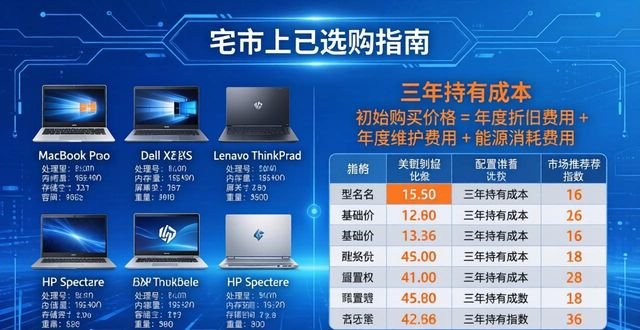
Price comparisons include three-year holding costs.
The total price of the two computers is 6,000 yuan. Brand A has a two-year warranty, but its accessories are expensive. Brand B not only enjoys a three-year warranty, but also receives an official extended warranty service. Choosing brand B is equivalent to saving 500 yuan in potential maintenance costs. Go to JD.com to check the historical price curve. You will find that prices during 618 and Double Eleven are usually 15% cheaper than usual. The price quoted by the offline physical store is 300 yuan lower than the online price. However, the store does not provide invoices. If there is no invoice, you cannot enjoy the official warranty service. This 300 yuan price difference cannot be saved.
It seems to be a cost-effective second-hand notebook, but most of the models after 2025 use low-temperature tin technology, and it is easy to have false soldering after two years of use. On Xianyu, machines with official extended warranty until 2028 can be purchased, but the seller needs to provide original purchase screenshots and invoices. When companies make bulk purchases, they can ask for discounts from agents. If they purchase more than 5 units, each unit can be 8% cheaper.
Follow these three maintenance steps and it will last you two more years.
Every other week, use the system's own disk cleanup method to delete the Windows update cache, which can free up 5 to 20GB of space. Run "powercfg /batteryreport" once a month to check the battery loss. If the loss exceeds 30%, then the battery should 是 replaced. The cooling fan needs to be disassembled and cleaned every six months. It costs 50 yuan to go to a repair shop to complete the relevant processing. Using a vacuum cleaner to aim at the air outlet to suck up dust can also play an emergency role.
When updating the system, don’t blindly chase new ones. The Win11 24H2 version always had a blue screen when it was first launched, so you have to wait three months before updating. Using the built-in Defender for anti-virus software is enough. If you install a third-party one, it will slow down the startup speed. You should unplug all USB flash drives before closing the laptop cover to sleep, otherwise it may burn out the USB controller.
Let me ask you another question: What is the most serious failure that has caused you to crash in this old computer you have? Is it a sudden blue screen, is the fan spinning crazily, or is the battery bulging? Write it in the comment area and we will help you figure out whether it should be repaired or replaced. If you find this article helpful, please give it a like so that more friends who choose computers can see it.




暂无评论内容